Infrastructure
Revealing the machinery.
SponsorCal handles the sponsorship workflow before, during, and after publish.
Verified audience data. A calendar sponsors can book from without emailing you. Assets collected automatically. Sponsor payments landing in your own Stripe account. Sponsor follow-through with a one-click rebook link.
Trust
Media Kit
Sponsors see verified numbers.
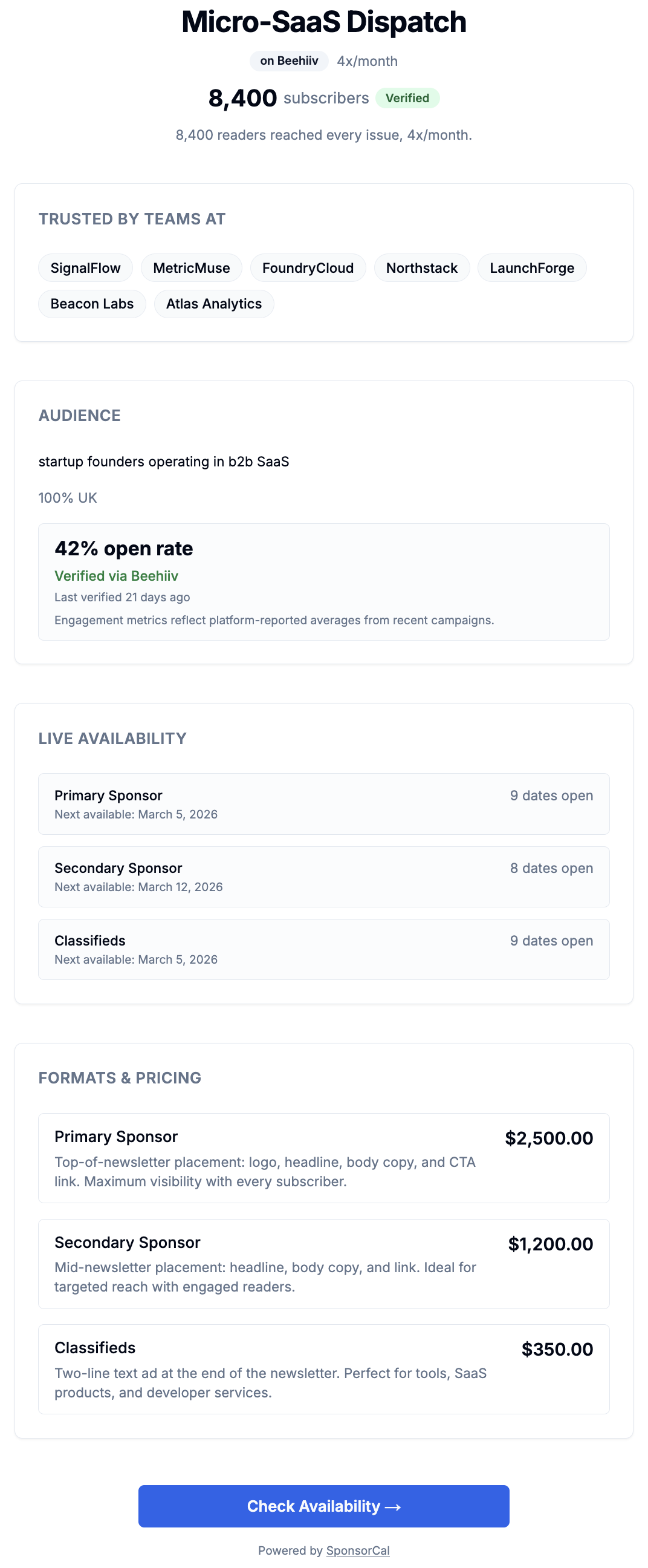
Your media kit is the page sponsors open before they book: one link with verified stats, past partners, and live slot availability. Verification is supported on Beehiiv and Kit only.
Subscriber count and open rate pulled directly from Beehiiv or Kit via API, timestamped and not self-reported.
Open rate is a weighted average across your last 25 sent campaigns. Platform-calculated, not estimated.
On Mailchimp, Substack, or any other platform: stats cannot be verified. The Verified badge will not appear.
Booking
Live Inventory
Your calendar never oversells.
Slots are held from the moment a sponsor starts checkout.
The slot is held the moment a sponsor starts checkout, before they reach the payment page.
When two sponsors start checkout for the last slot at the same moment, only one reservation is created. The slot cannot be sold twice.
Abandoned checkouts release capacity automatically after 10 minutes.
.png)
Delivery
Asset Pipeline
Assets arrive without chasing.
A deadline-first submission link is sent at booking, followed by automated reminders on a fixed schedule.
Sponsors receive a structured submission form with deadline and format requirements.
SponsorCal sends automatic reminders 3 days and 1 day before the deadline.
You're notified the moment assets arrive. Approve or request changes instantly.
.png)
Payments
Payout Integrity
The money is yours from the booking.
Your 95% is transferred into your own Stripe account as part of the sponsor's payment — not into a SponsorCal balance you have to claim. No invoice, no follow-up.
Sponsors pay upfront at checkout, and your 95% moves into your own Stripe account as part of that payment. Publishing releases nothing, because nothing is being withheld.
Publishing requires an archive URL. It's stored against the booking, never overwritten, and stands as your proof of delivery.
Moving the money on to your bank runs through Stripe, on Stripe's timing and your account's status — not on a date SponsorCal sets.
Follow-Through
Sponsor Reports
Your sponsor gets a report by default.
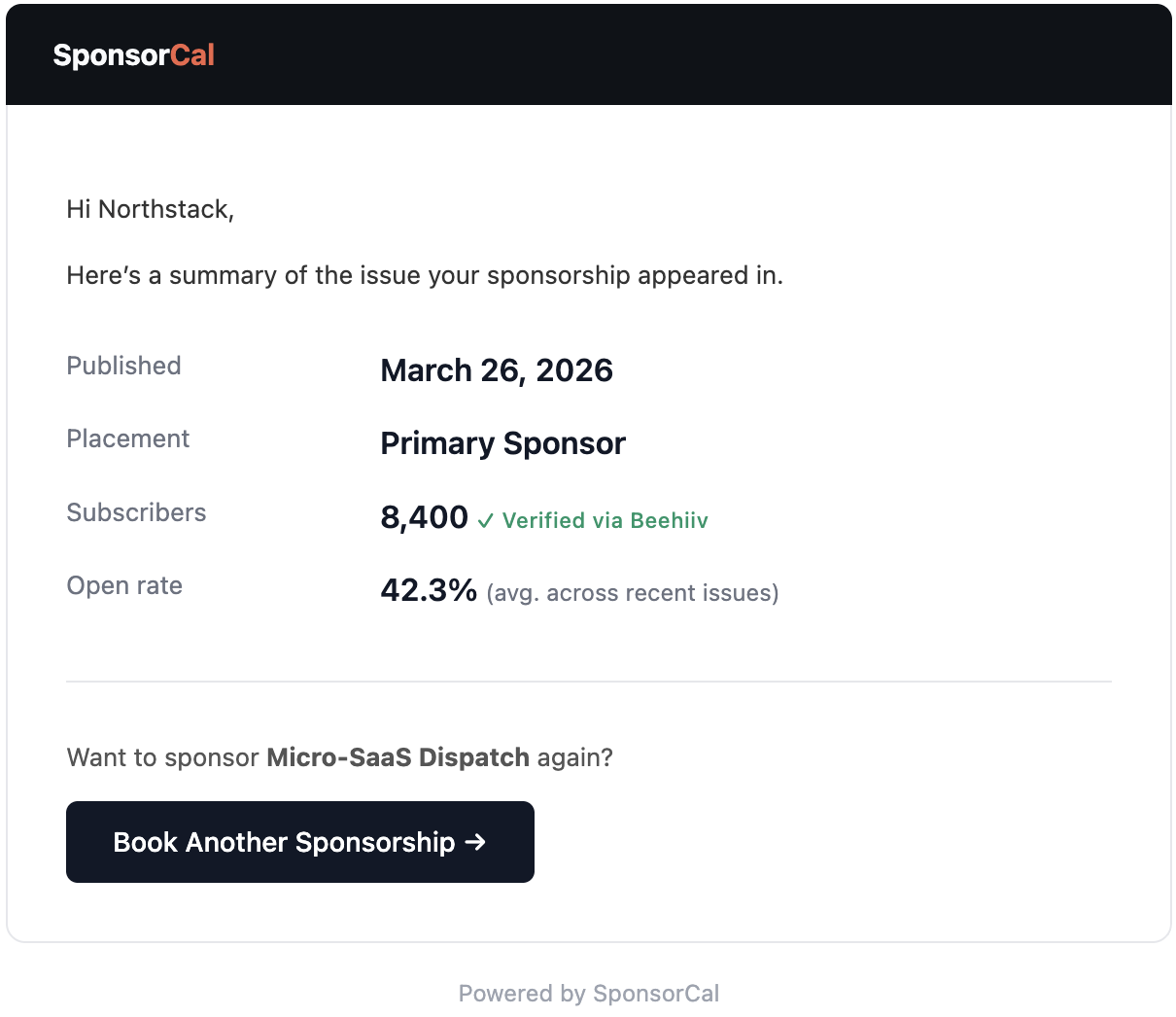
When you publish, your sponsor receives a delivery confirmation. If you have verified engagement data, they get a performance follow-up within 48 hours, with a one-click link to book again.
Instant delivery confirmation: issue date, placement, verified subscribers, their creative reflected back, and a link to the published issue.
Performance follow-up: your newsletter’s verified open rate sent within 48 hours, so sponsors can see the reach their ad received.
Every email includes a rebook link. When a sponsor books again from the report, SponsorCal tracks it automatically.
System Comparison
What changes when infrastructure handles it.
Sponsor emails an inquiry
Missing budget, dates, and context.
Back-and-forth on rate and availability
3–5 emails minimum. Calendar conflicts happen.
Send an invoice and wait
Net-30 terms.
Email sponsor to request ad copy
No deadline. No format spec. No reminder.
Newsletter goes out with no record
No archive. No proof of delivery.
Follow up again for payment
30–90 day wait.
No contact after the issue goes out
No confirmation. No performance data.
Sponsor opens your booking page
No email. No DM. Fully self-serve.
Verified stats build trust instantly
Real subscriber count. Real open rate.
Sponsor books and pays upfront
Card charged at checkout. Slot held immediately.
Asset reminders sent automatically
3 days out, then 1 day out.
You publish with an archive URL
Proof of delivery stored permanently.
Your 95% is already in your Stripe account
No invoice. No follow-up.
Sponsor receives performance summary and rebooks
Automated follow-through. One-click rebook link.
Set up once.
Everything else is automatic.
Your booking page, payment infrastructure and sponsor follow-through, live in one session.
Create your booking pageNo monthly fee · No credit card required · 5% only when you earn